


One of the most important task of Windows OS is file allocation. For this purpose Windows use two file management system FAT and NTFS. FAT ...
One of the most important task of Windows OS is file allocation. For this purpose Windows use two file management system FAT and NTFS. FAT is short for file allocation table developed by Microsoft and is used for MS DOS operating system and all non NT based operating system. FAT file system is supported by the all operating systems and its performance is limited because of large indexing. Because of large number of file indexing data storage device like hard disk is separated into many different segments. And each segment has different addresses and therefore it effects the file transfer speed of device. As i already explain that this method also helps in increasing pendrive speed of data transfer. Therefore to increase the speed of file system a new file system called NTFS was suggested. It is a standard file system for Windows NT, 2000, Vista, XP, 7 and 8 etc. So therefore to increase the speed of device we need to convert file system from FAT to NTFS. In this article we provide you different ways to convert FAT32 to NTFS.
How To Convert FAT32 To NTFS. ?
Method 1st:- Convert FAT32 To NTFS By Formatting.
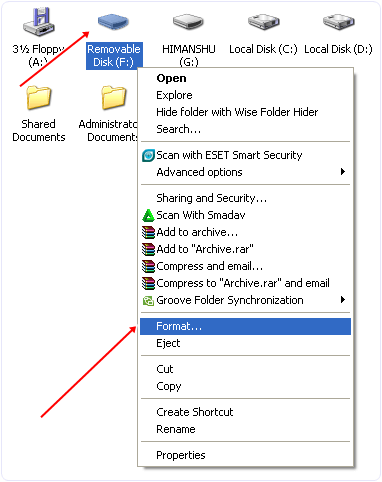
Step 1:- Right click on the drive whose format you want to change. Now you will see a popup Menu.
Step 2:- In the Pop Menu you have to looks for format option.

Step 3:- After click on the format option you will see a dialog box.
Step 4:- In the Dialog box you will see the file system option.
Step 5:- In this option you have to select the NTFS option.
Step 6:- Don’t tick the Quick format option.
Step 7:- Click on the start button.
Step 8:- After completing the process your drive format is converted to NTFS.

Step 2:- In the Pop Menu you have to looks for format option.
Step 3:- After click on the format option you will see a dialog box.
Step 4:- In the Dialog box you will see the file system option.
Step 5:- In this option you have to select the NTFS option.
Step 6:- Don’t tick the Quick format option.
Step 7:- Click on the start button.
Step 8:- After completing the process your drive format is converted to NTFS.
Method 2nd:- Using Partition Mini Tool.
Partition Mini Tool is one of the best tools to convert one files system to other file system. It provide you many file system so that you can convert your drive to desire file system including FAT 16, FAT 32, NTFS, Ext2, Ext3, Ext4 and Linux Swap. It also provide information about all the system drives that is about free space and allocated space and file system of each drive. It provide simple and Attractive interface with easy to use tools. It provide tools like merge two drive, Recover a drive, change label of a drive, delete a partition, copy a partition, resize a partition etc. It is a efficient tool that convert a file system into another within few minutes.
Steps To Convert FAT32 To NTFS Using Partition Mini Tool.
Step 1. Download and install partition Mini tool into your computer.
 Step 2. Double click the icon to run the software. Now see its operational Window.
Step 3. In the operational Window you will see all the system partition and removal drives.
Step 4. Now you have to select the partition whose file system you want to change.
Step 5. Now right click the partition and select the format option.

Step 6. After selecting the format option you will see a dialog.
Step 7. In the dialog box you have to label the drive and select file system which you want.
Step 8. Now click OK button your Drive is ready to us in desire format.
Step 2. Double click the icon to run the software. Now see its operational Window.Step 3. In the operational Window you will see all the system partition and removal drives.
Step 4. Now you have to select the partition whose file system you want to change.
Step 5. Now right click the partition and select the format option.
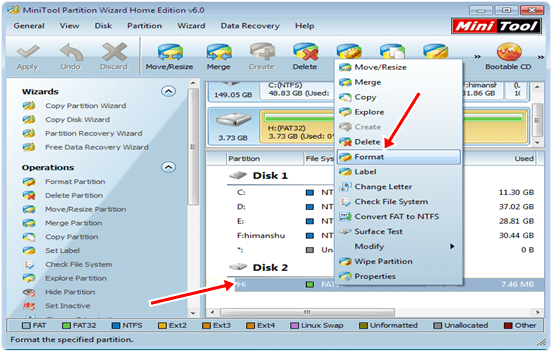
Step 6. After selecting the format option you will see a dialog.
Step 7. In the dialog box you have to label the drive and select file system which you want.
Step 8. Now click OK button your Drive is ready to us in desire format.
Method 3rd:- Convert FAT32 To NTFS By Using Command Prompt.
Step 1. Press window button then search CMD. In Windows XP Press Windows button and then click on RUN and Type CMD and press enter.
Step 2. Now you see the command prompt.
Step 3. In the command prompt type the following command.
Step 2. Now you see the command prompt.
Step 3. In the command prompt type the following command.
convert d: /fs:ntfs
Step 4. After typing command press enter.
Step 5. Then your file system will convert into ntfs.
Step 5. Then your file system will convert into ntfs.


COMMENTS